Search overview
Switera Search lets Builders add a searchable data set to an app without exposing the underlying search engine to customer-facing code. The launch surface is intentionally small: create an app-owned index, submit tenant-scoped documents, issue short-lived tenant search tokens, and run a query for one organization at a time.
Use this page when you want to prove the first searchable workflow before wiring production sync from your backend.
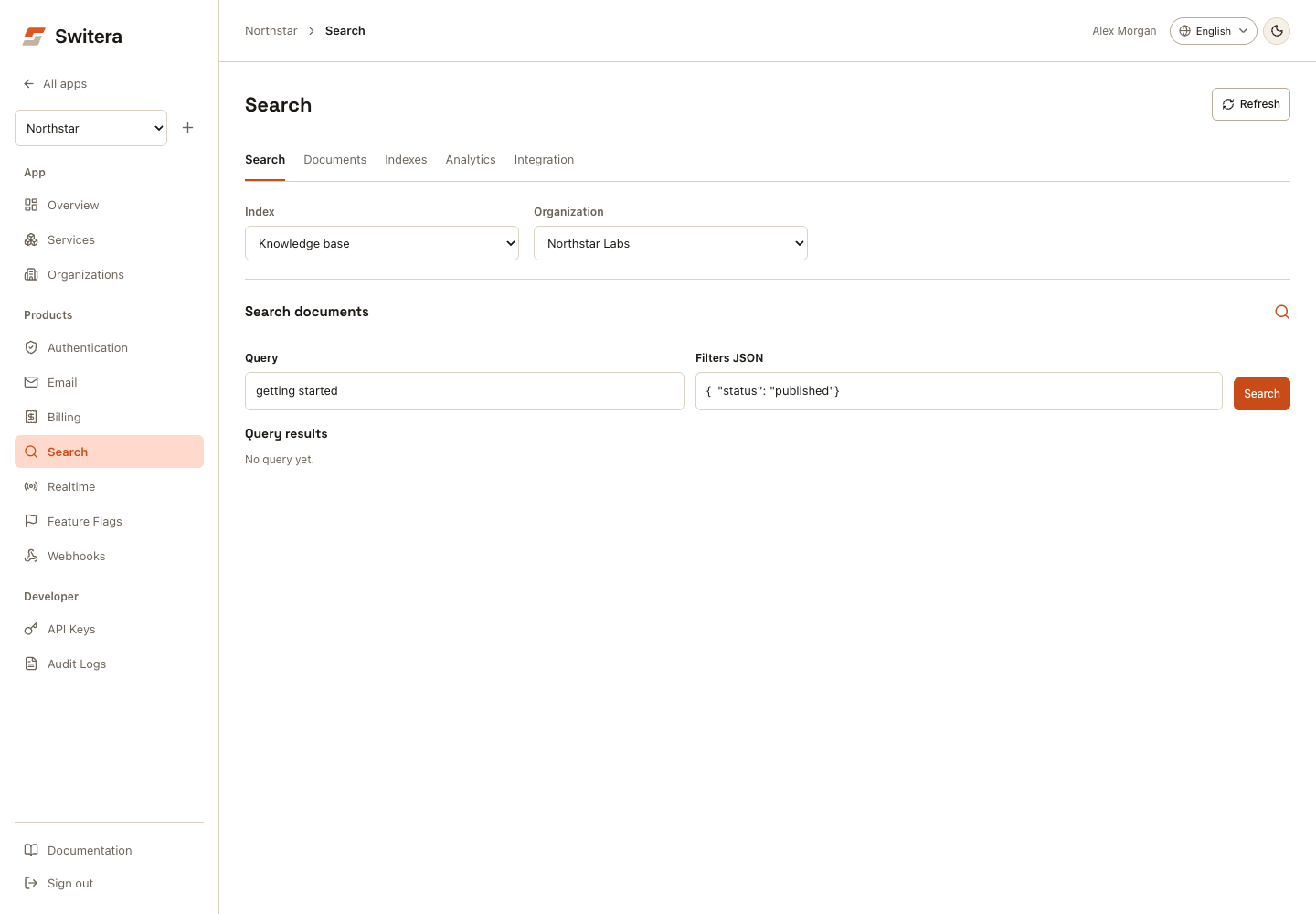
Console workflow
- Open Indexes > Create index. Enter the name, slug, searchable attributes, and filterable attributes, then create the index.
- In Documents, select the index and organization. Select Add document, enter its external ID and JSON payload, then select Index document.
- Open Search, confirm the same scope, enter a query and optional JSON filters, then select Search. An empty result is distinct from a failed query.
- Open Analytics for query counts, no-result rate, and latency.
- Open Integration for generated SDK examples.
On mobile, select a view using Search section. Switching views retains form drafts; reloading does not. Document deletion requires confirmation. A failed document or analytics read shows Retry, not an empty-success result.
What Search manages
| Area | Use it for | Launch state |
|---|---|---|
| Indexes | Define a searchable data set for one app. | Available from the app console and REST API. |
| Documents | Submit JSON payloads into an index. | Available for app-scoped and tenant-scoped metadata, with tenant-scoped indexes recommended. |
| Tenant isolation | Keep customer search results separated by organization. | Tenant-scoped indexes require an organization ID for writes and queries. |
| Tenant tokens | Allow browser clients to query without a secret app key. | Available through authenticated Connect sessions. |
| Query testing | Run the first query before connecting production sync. | Available from the app console and REST API. |
| Query analytics | See basic query volume, no-result rate, and latency. | Available per index, with optional organization scope. |
| Lifecycle events | Notify your backend when Search resources change. | Available through Webhooks/Events subscriptions. |
Recommended setup order
- Create or select an app.
- Create at least one organization for that app.
- Open Services > Search.
- Create the first tenant-scoped index.
- Add a sample document with the selected organization.
- Run a query with the same organization selected.
- Connect your backend to submit real documents through the REST API.
- In your SaaS frontend, request a short-lived tenant token from the signed-in user session before calling the browser-safe query endpoint.
Do not expose a browser-only write path for Search. Document indexing should run from trusted backend code using a secret app key.
Create an index
Indexes are app-scoped. A Search index in one app cannot be queried from another app.
POST /api/v1/apps/{appId}/search/indexes
Authorization: Bearer sf_secret_...
Content-Type: application/json
{
  "name": "Knowledge base",
  "slug": "knowledge_base",
  "description": "Searchable help articles and customer-facing content",
  "tenant_scoped": true,
  "searchable_attributes": ["title", "summary", "content"],
  "filterable_attributes": ["status", "category"]
}
Success returns a SearchIndex with document_count, searchable_attributes, filterable_attributes, and timestamps.
Index a document
Tenant-scoped indexes require tenant_id on document writes. Use external_id when your own system already has a stable document ID; Switera will use it to replace the existing payload for that tenant instead of creating duplicates.
POST /api/v1/apps/{appId}/search/indexes/{indexId}/documents
Authorization: Bearer sf_secret_...
Content-Type: application/json
{
  "tenant_id": "org_...",
  "external_id": "article-001",
  "payload": {
    "title": "Getting started",
    "summary": "First steps for a new customer",
    "content": "Create an account, join an organization, and complete setup.",
    "status": "published",
    "category": "docs"
  }
}
Run a tenant-scoped query
Queries against tenant-scoped indexes require tenant_id. Filters must be declared in the index filterable_attributes; this prevents accidental filtering on fields that were never configured for search.
POST /api/v1/apps/{appId}/search/indexes/{indexId}/query
Authorization: Bearer sf_secret_...
Content-Type: application/json
{
  "query": "getting started",
  "tenant_id": "org_...",
  "filters": {
    "status": "published"
  },
  "page": 1,
  "limit": 10
}
Success returns hits, estimated_total, processing_time_ms, page, and limit.
View basic query analytics
Switera records successful server-side and browser-token queries for each app-owned index. Use this summary to catch empty-result searches and slow query behavior before your customers report it.
GET /api/v1/apps/{appId}/search/indexes/{indexId}/analytics?tenant_id=org_...&days=30
Authorization: Bearer sf_secret_...
tenant_id is optional. Omit it to summarize the whole index, or include it to inspect one organization.
{
  "app_id": "app_...",
  "index_id": "search_index_...",
  "tenant_id": "org_...",
  "window_days": 30,
  "query_count": 128,
  "no_result_count": 9,
  "no_result_rate": 0.0703125,
  "average_latency_ms": 12,
  "p95_latency_ms": 31,
  "server_query_count": 18,
  "browser_query_count": 110,
  "last_queried_at": "2026-07-07T11:53:32Z"
}
React to lifecycle events
Search emits built-in Webhooks/Events when app-owned Search resources change. Use these events to start sync jobs, refresh downstream caches, or notify your operations workflow after an indexing change.
Subscribe to these event types from Products > Webhooks:
| Event | When it fires |
|---|---|
sf.search.index.created | A Builder creates a Search index for an app. |
sf.search.document.indexed | A trusted backend creates or replaces a document in an index. |
sf.search.document.deleted | A trusted backend deletes a document from an index. |
Search events use the same webhook envelope, signatures, delivery attempts, and retries as other Switera events. The Search-specific payload is available under data.index and, for document events, data.document.
{
  "id": "evt_...",
  "type": "sf.search.document.indexed",
  "version": "v1",
  "timestamp": "2026-07-09T12:00:00Z",
  "app_id": "app_...",
  "tenant_id": "org_...",
  "source": "sf.search",
  "data": {
    "index": {
      "id": "search_index_...",
      "slug": "knowledge_base",
      "name": "Knowledge base",
      "tenant_scoped": true,
      "primary_key": "id"
    },
    "document": {
      "id": "search_doc_...",
      "index_id": "search_index_...",
      "tenant_id": "org_...",
      "external_id": "article-001",
      "created_at": "2026-07-09T11:55:00Z",
      "updated_at": "2026-07-09T12:00:00Z"
    }
  }
}
Use the SDKs
Use backend SDKs for trusted indexing work. These calls use your app secret key, so they belong in your server, job worker, or sync process.
- Go
- Python
client := switera.NewClient(
  os.Getenv("SWITERA_API_KEY"),
  os.Getenv("SWITERA_APP_ID"),
  switera.WithBaseURL("https://switera.com"),
)

tenantID := "org_..."
externalID := "article_123"

_, err := client.Search.UpsertDocument(ctx, "search_index_...", switera.UpsertSearchDocumentRequest{
  TenantID:   &tenantID,
  ExternalID: &externalID,
  Payload: map[string]any{
    "title":  "Getting started",
    "status": "published",
  },
})
import os

from switera import SwiteraClient

client = SwiteraClient(
    api_key=os.environ["SWITERA_API_KEY"],
    app_id=os.environ["SWITERA_APP_ID"],
    base_url="https://switera.com",
)

client.search.upsert_document(
    "search_index_...",
    {
        "tenant_id": "org_...",
        "external_id": "article_123",
        "payload": {
            "title": "Getting started",
            "status": "published",
        },
    },
)
Generate integration recipes
Open the Integration view after you create or select an index to generate copy-paste starting points for your stack.
The first recipe surface supports:
| Recipe output | What it includes |
|---|---|
.env.example | Server-only SWITERA_API_KEY, app ID, index ID, base URL, and browser-safe public values where the selected framework needs them. |
| Backend indexing code | Trusted server code that submits documents to the selected index with your organization variable and sample payload. |
| Browser-safe query code | @switera/auth tenant-token code that signs the selected index, organization variable, and fixed filters before running a browser query. |
Supported recipe targets are SvelteKit, Next.js, Express, Go, and Python. The generated snippets keep secret app keys on the server side and use tenant search tokens for browser code.
The next integration option is CLI-assisted insertion. That later flow will write framework-specific files, but the current console recipes are intentionally copy-paste so Builders can inspect every line before adopting it.
Issue a browser-safe tenant token
Server-side indexing uses a secret app key. Browser-side query should not. Once an End User is signed in to your SaaS app, call the Connect token endpoint with their access token. Switera resolves the app from that session, verifies the user belongs to the requested organization, and signs the app, index, organization, and optional fixed filters into a short-lived token.
POST /api/v1/connect/search/tokens
Authorization: Bearer end_user_access_token
Content-Type: application/json
{
  "index_id": "search_index_...",
  "tenant_id": "org_...",
  "filters": {
    "status": "published"
  },
  "expires_in": 600
}
Success returns a token, expires_in, expires_at, and query_url. expires_in is optional; Switera defaults to a short lifetime and caps long requests.
Use fixed filters when your UI should never escape part of the data set, such as status = published. The query endpoint will reject attempts to override those signed filters.
Query with a tenant token
Use the browser-safe query endpoint from your SaaS frontend. Pass the token in the JSON body or as a Bearer token. The token decides the app, index, and organization; the browser cannot replace those values.
POST /api/v1/connect/search/query
Authorization: Bearer search_token
Content-Type: application/json
{
  "query": "getting started",
  "filters": {
    "category": "docs"
  },
  "page": 1,
  "limit": 10
}
The response shape is the same as the server-side query endpoint.
With @switera/auth, the same browser flow looks like this:
const token = await auth.issueSearchTenantToken({
  index_id: "search_index_...",
  tenant_id: currentOrganization.id,
  filters: { status: "published" },
  expires_in: 600,
})

const results = await auth.querySearchWithToken({
  token: token.token,
  query: searchTerm,
  filters: { category: "docs" },
  page: 1,
  limit: 10,
})
Permissions
Search management routes are app-scoped settings routes. Trusted backend integrations need a secret app key with manage_settings scope.
Browser access requires a signed-in Builder with permission to manage app settings.
Tenant token issuance requires a signed-in End User for the managed SaaS app. The End User must be an active member of the organization requested in tenant_id.
Current boundaries
- Search does not include relevance tuning, synonyms, advanced analytics dashboards, or bulk import UI yet.
- Search does not replace your source database. Keep your own source of truth and submit Search documents from trusted backend jobs.
- Search does not support cross-app or cross-tenant querying.
Related pages: