Realtime overview
Switera Realtime lets your SaaS frontend subscribe to live app, tenant, user, and role channels while your backend publishes messages through a trusted API key. The browser never receives runtime secrets. It receives short-lived Switera-issued tokens derived from the signed-in Connect user.
Use Realtime for live notifications, workspace updates, activity feeds, background-job progress, collaboration indicators, and customer-facing dashboards that should update without refresh.
Launch surface
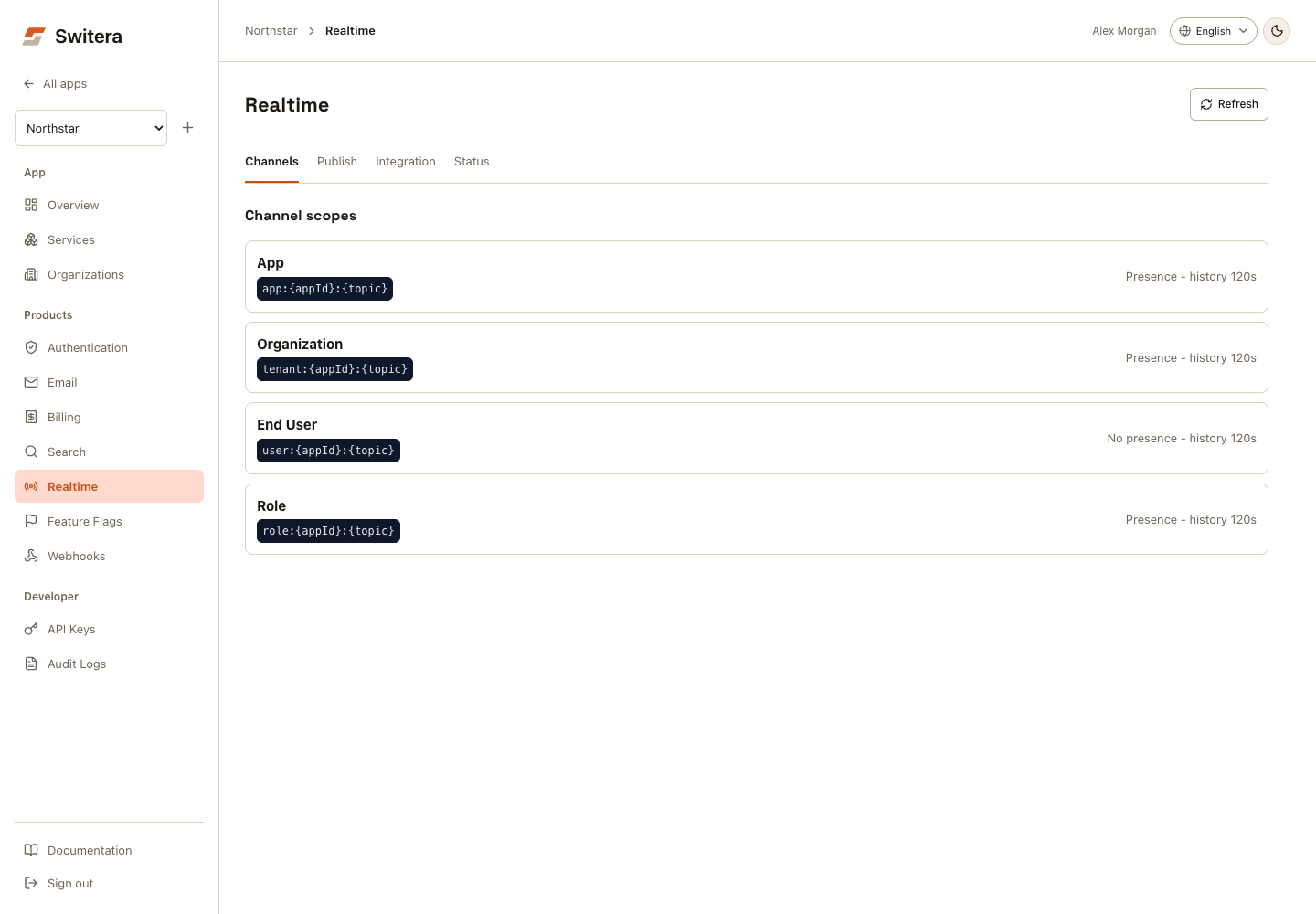
Console workflow
- Open Channels and select an app, organization, end-user, or role scope. This opens Publish with a sample channel; it does not send a message.
- Replace placeholders with real IDs and the intended topic.
- Enter a JSON payload. Publish test sends a real message to that channel; use a test organization and a listening test client.
- Open Integration for client token examples, or Status for runtime checks.
On mobile, use Realtime section to change views. Publish drafts remain while switching views but are not saved across reloads. A publish receipt does not prove that a subscriber received or processed the message.
Capabilities
| Area | Use it for | Launch state |
|---|---|---|
| Connection tokens | Let a signed-in Connect user open a websocket connection. | Available through /api/v1/connect/realtime/token. |
| Subscription tokens | Authorize one private app, tenant, user, or role channel. | Available through /api/v1/connect/realtime/subscriptions. |
| Publish API | Send trusted backend events to one channel. | Available through /api/v1/apps/{appId}/realtime/publish. |
| Runtime status | Verify token signing, public websocket URL, and runtime health. | Available in the app console and API. |
| Channel scopes | Keep live messages scoped to the intended audience. | Available for app, tenant, user, and role namespaces. |
Channel scopes
Channels are part of your application contract. Keep topic names stable once application code subscribes to them.
| Scope | Pattern | Typical audience |
|---|---|---|
| App | app:{appId}:{topic} | All connected users for one app. |
| Tenant | tenant:{appId}:{tenantId}:{topic} | Users who belong to one customer organization. |
| User | user:{appId}:{userId}:{topic} | One app user. |
| Role | role:{appId}:{tenantId}:{role}:{topic} | Members of one organization with a specific role. |
Good launch examples:
app:app_123:broadcast
tenant:app_123:tenant_456:updates
user:app_123:user_789:notifications
role:app_123:tenant_456:admin:updates
Runtime readiness
Open Realtime > Status or call the runtime endpoint before wiring frontend code.
GET /api/v1/apps/{appId}/realtime/runtime
Authorization: Bearer sf_secret_...
{
  "status": "ready",
  "summary": "Realtime runtime checks are passing.",
  "websocket_url": "wss://switera.com/realtime/connection/websocket",
  "namespaces": [
    {
      "name": "tenant",
      "pattern": "tenant:{appId}:{tenantId}:{topic}",
      "presence": true,
      "history": "120s"
    }
  ],
  "checks": [
    {
      "key": "token_secret",
      "status": "ready",
      "summary": "Realtime token signing is configured."
    }
  ]
}
Treat any setup_required or needs_attention status as a launch blocker for realtime features.
Issue a connection token
Your SaaS frontend calls the Connect route after the user is signed in. The request uses the existing browser session or Connect bearer token.
POST /api/v1/connect/realtime/token
Content-Type: application/json
{
  "tenant_id": "tenant_456"
}
{
  "token_type": "Bearer",
  "expires_in": 900,
  "app_id": "app_123",
  "user_id": "user_789",
  "tenant_id": "tenant_456",
  "role": "admin",
  "websocket_url": "wss://switera.com/realtime/connection/websocket",
  "channels": [
    "app:app_123:broadcast",
    "user:app_123:user_789:notifications",
    "tenant:app_123:tenant_456:updates",
    "role:app_123:tenant_456:admin:updates"
  ]
}
Switera derives app_id, user_id, tenant_id, email, and role from trusted Auth and organization records. Do not send those values from browser code except the tenant the user is trying to enter.
Authorize a private channel
For private subscriptions, ask Switera for one subscription token per channel.
POST /api/v1/connect/realtime/subscriptions
Content-Type: application/json
{
  "channel": "tenant:app_123:tenant_456:updates"
}
Switera checks that:
- app channels belong to the signed-in app,
- tenant channels belong to an organization where the user is an active member,
- user channels match the resolved app user,
- role channels match the user's active organization role.
Publish from a trusted backend
Publish from your backend, job runner, or automation using an app secret key.
POST /api/v1/apps/{appId}/realtime/publish
Authorization: Bearer sf_secret_...
Content-Type: application/json
{
  "channel": "tenant:app_123:tenant_456:updates",
  "data": {
    "type": "invoice.paid",
    "invoice_id": "inv_123"
  },
  "idempotency_key": "invoice-paid-inv_123"
}
{
  "channel": "tenant:app_123:tenant_456:updates",
  "published": true
}
Browser token example
const tokenResponse = await auth.issueRealtimeConnectionToken({
  tenant_id: 'tenant_456'
});

const channel = 'tenant:app_123:tenant_456:updates';
const subscriptionToken = await auth.issueRealtimeSubscriptionToken({
  channel
});

console.log(tokenResponse.websocket_url);
console.log(tokenResponse.token);
console.log(subscriptionToken.token);
Use the returned websocket_url and tokens with the realtime client layer in
your application. First-party Switera connection wrappers are tracked in the SDK
roadmap.
What not to do
- Do not put app secret keys in browser code.
- Do not publish directly to the internal realtime runtime.
- Do not use app-wide broadcast channels for tenant-specific data.
- Do not treat channel names as user input. Build them from trusted app, tenant, user, and role IDs.