Feature Flags overview
Switera Feature Flags give Builders a controlled way to release app behavior without shipping new configuration code for every tenant. The launch surface is provider-neutral: your team works with Switera flags, environments, targeting, rollout percentage, and evaluation responses. Backend engine details stay internal.
Use Feature Flags when you need to enable a feature for one organization, a specific user, a role, a plan, an email domain, or a small percentage of traffic before making it generally available.
What Feature Flags manage
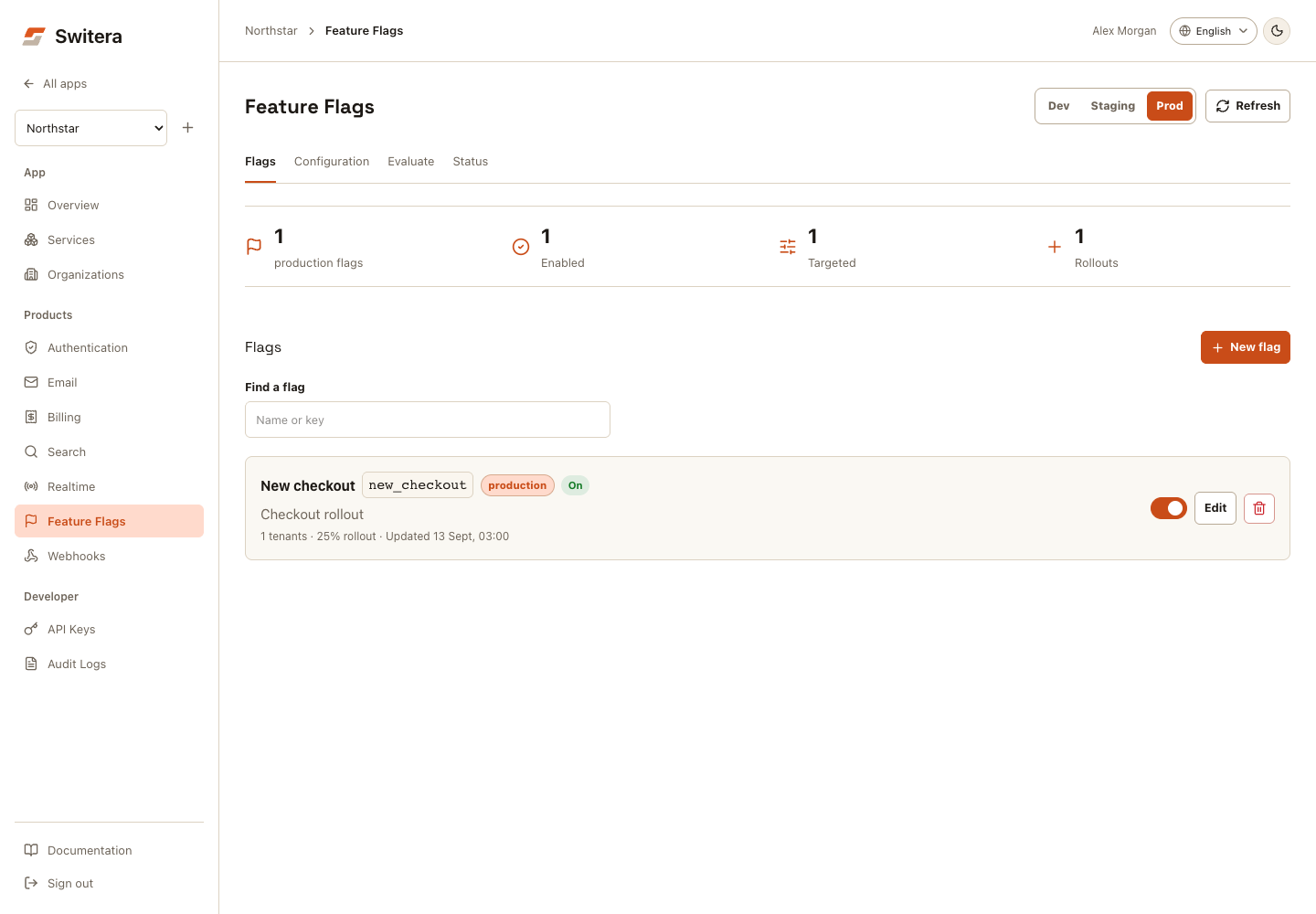
Console workflow
- Select Dev, Staging, or Prod and find a flag by name or key.
- Select New flag or Edit to open Configuration.
- Set the name, key, enabled/default state, and rollout percentage. Expand Audience targeting for organization IDs, end-user IDs, roles, plans, or domains.
- Save the flag, then open Evaluate to test a specific request context.
- Open Status for runtime, cache, and synchronization checks.
On mobile, choose a view with Feature Flags section. Configuration drafts remain when switching views, but switching environments or reloading can replace them. Save first. Evaluation does not change the flag or prove frontend adoption.
Capabilities
| Area | Use it for | Launch state |
|---|---|---|
| App flags | Create stable keys such as new_checkout or beta_reports. | Available from the app console and REST API. |
| Environments | Keep development, staging, and production decisions separate while using the same stable flag key. | Available with production as the default for older API/SDK calls. |
| Promotion | Copy a tested flag from development to staging, then from staging to production. | Available from the app console and REST API. |
| Targeting | Turn a flag on for tenants, users, roles, plans, or email domains. | Available in the first launch surface. |
| Rollout percentage | Gradually expose a flag to a deterministic percentage of users. | Available through server-side evaluation. |
| Runtime evaluation | Ask Switera whether a flag is enabled for one request context. | Available from the console, REST API, and Connect current-user route. |
| Runtime readiness | Check whether the internal rollout runtime, cache, and sync path are ready. | Available from the app console and REST API. |
| SDK helpers | Read flags from trusted backend code or signed-in SaaS frontends. | Available for Go, Python, @switera/auth, React, and Svelte. |
| Events | Emit sf.flags.flag.created, sf.flags.flag.updated, sf.flags.flag.enabled, sf.flags.flag.disabled, and sf.flags.flag.promoted. | Available through Webhooks/Events. |
Recommended setup order
- Create or select an app.
- Open Services > Feature Flags.
- Select Dev, Staging, or Prod.
- Select New flag and create a flag with a stable key.
- Promote the same key from Dev to Staging, then from Staging to Prod when validation is complete.
- Add direct targets or a rollout percentage.
- Use Evaluate to verify the expected decision.
- Check Status before launch.
- Call the backend evaluation endpoint from trusted backend code, or the Connect current-user endpoint from a signed-in SaaS frontend.
Keep flag keys stable once your application code reads them. Rename display names freely, but treat the key plus environment like an API contract.
Create a flag
POST /api/v1/apps/{appId}/flags
Authorization: Bearer sf_secret_...
Content-Type: application/json
{
  "environment": "staging",
  "key": "new_checkout",
  "name": "New checkout",
  "description": "Enable the next checkout experience for selected customers.",
  "enabled": true,
  "default_value": false,
  "rollout_percentage": 10,
  "tenant_ids": ["org_123"],
  "roles": ["owner"],
  "plan_keys": ["launch"],
  "email_domains": ["example.com"]
}
Success returns a FeatureFlag record with environment, targeting lists, rollout percentage, and timestamps.
If environment is omitted, Switera uses production. Valid values are development, staging, and production.
Evaluate a flag
Use evaluation from trusted backend code first. The response is deliberately small so it can be cached or mapped into your own application context.
POST /api/v1/apps/{appId}/flags/new_checkout/evaluate
Authorization: Bearer sf_secret_...
Content-Type: application/json
{
  "environment": "staging",
  "tenant_id": "org_123",
  "user_id": "user_456",
  "role": "owner",
  "plan_key": "launch",
  "email": "founder@example.com"
}
{
  "key": "new_checkout",
  "environment": "staging",
  "enabled": true,
  "reason": "tenant_target",
  "default_value": false,
  "rollout_percentage": 10
}
Evaluation reasons are meant for debugging and logging:
| Reason | Meaning |
|---|---|
missing | No flag exists for that key. |
flag_disabled | The flag is off, so Switera returned the default value. |
user_target | The user ID matched a direct target. |
tenant_target | The tenant/organization ID matched a direct target. |
role_target | The supplied role matched. |
plan_target | The supplied plan key matched. |
email_domain_target | The email domain matched. |
rollout_all | Rollout is 100%. |
rollout_match | The deterministic rollout bucket is inside the percentage. |
rollout_default | The rollout bucket is outside the percentage. |
default | No target matched and rollout is 0%. |
Environments
Feature flags are scoped to both app and environment. This lets you keep the same key in development, staging, and production while changing rollout state independently.
| Environment | Typical use |
|---|---|
development | Local or early internal testing. |
staging | Pre-production QA, demos, and customer validation. |
production | Live customer traffic. This is the default when no environment is supplied. |
Environment support is intentionally simple for launch:
- Listing flags accepts
?environment=production,?environment=staging, or?environment=development. - Create/update requests can set
environment. - Evaluation requests can set
environment; omitted values default toproduction. - Webhook payloads include
data.flag.environment.
Promote a flag
Promotion copies the selected flag into the next environment without deleting the source flag. Switera supports two launch transitions:
development->stagingstaging->production
If the target environment does not have the same flag key yet, Switera creates it. If it already exists, Switera overwrites the target flag's editable rollout and targeting configuration while preserving the target record ID.
POST /api/v1/apps/{appId}/flags/{flagId}/promote
Authorization: Bearer sf_secret_...
Content-Type: application/json
{
  "target_environment": "staging"
}
The request body is optional. If omitted, Switera derives the next valid target environment from the source flag.
{
  "source_environment": "development",
  "target_environment": "staging",
  "created": true,
  "source_flag": {
    "id": "flag_dev_123",
    "environment": "development",
    "key": "new_checkout"
  },
  "target_flag": {
    "id": "flag_staging_456",
    "environment": "staging",
    "key": "new_checkout"
  }
}
Runtime readiness and cache
Use the runtime readiness endpoint to verify the app-facing Feature Flags path before launch or after changing deployment configuration.
GET /api/v1/apps/{appId}/flags/runtime
Authorization: Bearer sf_secret_...
{
  "status": "ready",
  "summary": "Feature Flags runtime checks are passing.",
  "cache": {
    "enabled": true,
    "status": "ready",
    "ttl_seconds": 15,
    "invalidation_policy": "write-through"
  },
  "sync": {
    "mode": "app_store_source_of_truth",
    "status": "ready",
    "summary": "Runtime write sync is configured; Switera serves decisions from the app flag store."
  },
  "checks": [
    {
      "key": "flag_store",
      "label": "Flag store",
      "status": "ready"
    },
    {
      "key": "runtime_health",
      "label": "Runtime health",
      "status": "ready"
    }
  ]
}
The evaluation cache is intentionally short-lived and write-through. Switera invalidates cached decisions when a flag is created, updated, promoted, or deleted. Those same successful writes are mirrored into the internal rollout runtime for operational consistency. Cache misses and sync retries are still safe because the app flag store remains the source of truth for launch evaluation.
Targeting rules
Targets are additive. If any direct target matches, the flag evaluates to enabled: true before percentage rollout is checked.
| Target | Input field | Notes |
|---|---|---|
| Organization | tenant_id | Use the Switera tenant/organization ID. |
| User | user_id | Use your app user ID or the Switera user ID you store in your backend. |
| Role | role | Values are normalized to lowercase. |
| Plan | plan_key | Use the same stable keys you use in Billing. |
| Email domain | email | Target list stores domains such as example.com, not full addresses. |
If no direct target matches, Switera applies the rollout percentage. Rollout is deterministic for the same app, flag key, and subject, so the same user receives the same decision across requests.
Evaluate for the current browser user
Use current-user evaluation from frontend code after the user signs in through Switera Auth. The browser call does not send app_id, user_id, role, or email. Switera derives those from the access token and verified organization membership.
POST /api/v1/connect/flags/new_checkout/evaluate
Authorization: Bearer <current-user-access-token>
Content-Type: application/json
{
  "environment": "production",
  "tenant_id": "org_123",
  "plan_key": "launch"
}
If tenant_id is present, Switera verifies that the signed-in user is an active member of that organization before evaluating tenant and role targeting.
Treat browser flag decisions as UI gating, not authorization. Enforce paid-plan entitlements and protected actions in your backend before returning sensitive data or mutating state.
import { SwiteraAuth } from '@switera/auth';

const auth = SwiteraAuth.init({
  clientId: import.meta.env.VITE_SWITERA_CLIENT_ID,
  redirectUri: `${window.location.origin}/callback`,
  domain: 'https://switera.com',
});

const decision = await auth.evaluateFeatureFlag('new_checkout', {
  environment: 'production',
  tenant_id: currentOrgId,
  plan_key: currentPlanKey,
});

if (decision.enabled) {
  renderNewCheckout();
}
import { useEffect, useState } from 'react';
import { useAuth } from '@switera/auth-react';

export function CheckoutEntry({ tenantId }: { tenantId: string }) {
  const { evaluateFeatureFlag } = useAuth();
  const [enabled, setEnabled] = useState(false);

  useEffect(() => {
    evaluateFeatureFlag('new_checkout', { environment: 'production', tenant_id: tenantId })
      .then((decision) => setEnabled(decision.enabled));
  }, [evaluateFeatureFlag, tenantId]);

  return enabled ? <NewCheckout /> : <CurrentCheckout />;
}
<script lang="ts">
  import { useAuth } from '@switera/auth-svelte';

  const auth = useAuth();
  export let tenantId: string;

  let newCheckout = false;

  $effect(() => {
    auth.evaluateFeatureFlag('new_checkout', { environment: 'production', tenant_id: tenantId })
      .then((decision) => {
        newCheckout = decision.enabled;
      });
  });
</script>
Use the SDK helpers
Evaluate flags from trusted backend code with a secret app key. Do not call these helpers directly from browser code because the secret key must stay server-side.
client := switera.NewClient(
    os.Getenv("SWITERA_SECRET_KEY"),
    os.Getenv("SWITERA_APP_ID"),
    switera.WithBaseURL("https://switera.com"),
)

decision, err := client.FeatureFlags.Evaluate(ctx, "new_checkout", switera.EvaluateFeatureFlagRequest{
    Environment: "production",
    TenantID:    "org_123",
    UserID:      "user_456",
    Role:        "owner",
    PlanKey:     "launch",
    Email:       "founder@example.com",
})
if err != nil {
    return err
}
if decision.Enabled {
    // Render the new checkout path.
}
import os

from switera import SwiteraClient

client = SwiteraClient(
    api_key=os.environ["SWITERA_SECRET_KEY"],
    app_id=os.environ["SWITERA_APP_ID"],
    base_url="https://switera.com",
)

decision = client.feature_flags.evaluate("new_checkout", {
    "environment": "production",
    "tenant_id": "org_123",
    "user_id": "user_456",
    "role": "owner",
    "plan_key": "launch",
    "email": "founder@example.com",
})

if decision["enabled"]:
    # Render the new checkout path.
    ...
React to flag lifecycle events
Feature Flags emits built-in Webhooks/Events after successful flag mutations. Subscribe from Products > Webhooks when your backend needs to refresh a cache, start a rollout workflow, or notify operations.
| Event type | When it fires |
|---|---|
sf.flags.flag.created | A Builder creates a flag. |
sf.flags.flag.updated | A Builder changes flag metadata, targeting, default value, or rollout percentage without changing enabled state. |
sf.flags.flag.enabled | A Builder changes a flag from disabled to enabled. |
sf.flags.flag.disabled | A Builder changes a flag from enabled to disabled. |
sf.flags.flag.promoted | A Builder copies a flag from development to staging or staging to production. |
Events use the standard Switera webhook envelope. The Feature Flags payload is available under data.flag. Promotion events also include data.promotion.source_environment, data.promotion.target_environment, and data.promotion.target_created.
What not to do yet
- Do not expose app secret keys in browser code.
- Do not model experiments as flags yet; experiment metrics are a later Analytics slice.
- Do not promote directly from development to production; use staging as the validation step.
- Do not surface backend engine terminology to your users.
- Do not depend on internal runtime sync for product correctness yet; launch decisions are served from Switera's app-scoped flag store.
Next launch work
- Provider-side targeting parity and broader SDK parity after the launch API settles.