API management and limits
Use API management when your backend needs to call Switera on behalf of one app. Secret keys are app-scoped credentials for trusted servers. They can be limited by scope, expiration, caller IP, per-key request rate, and organization request rate.
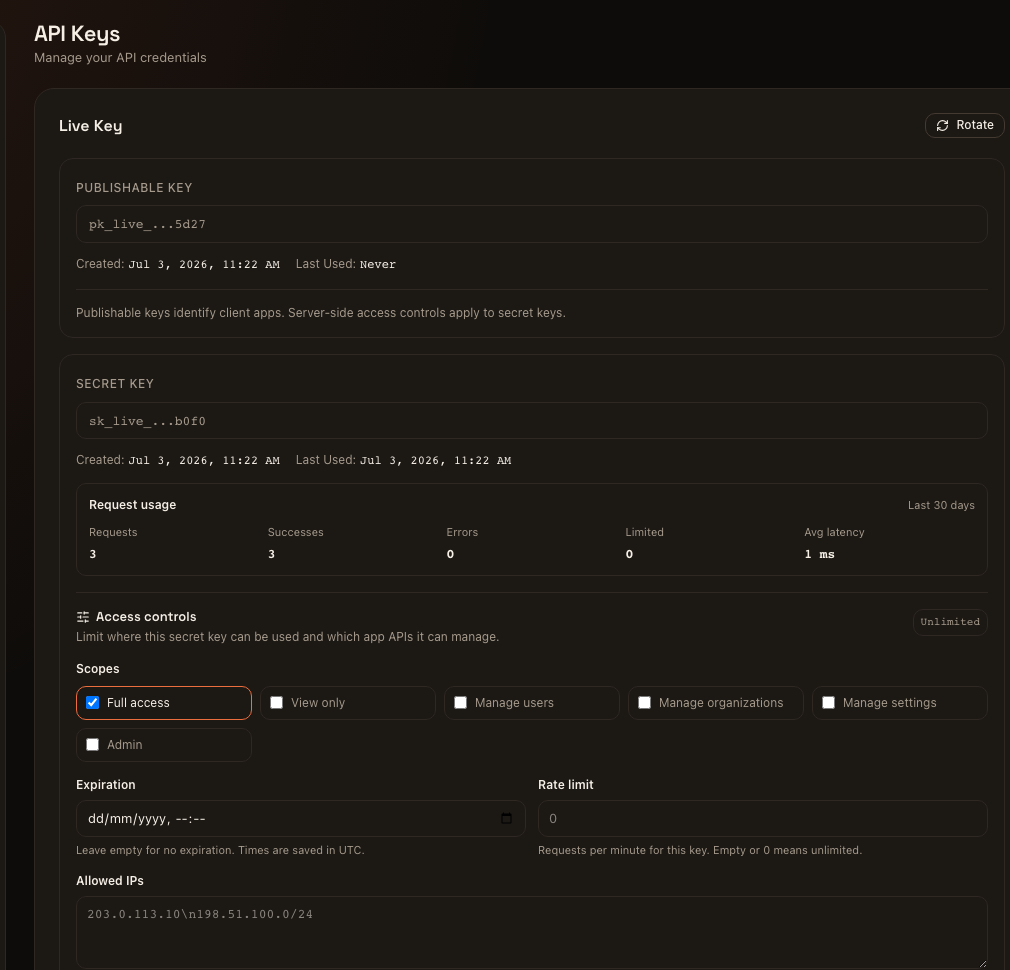
Server-to-server model
Backend calls use the app ID in the URL and a secret key in the Authorization header:
curl "https://switera.com/api/v1/apps/$APP_ID/tenants" \
  -H "Authorization: Bearer $SWITERA_SECRET_KEY"
Keep these rules strict:
- Use secret keys only from trusted backend services.
- Do not put secret keys in browsers, mobile apps, public logs, screenshots, tickets, or frontend bundles.
- Use publishable keys only where the API expects a public app identifier.
- Keep test and live keys separate.
- Rotate a key before removing the old value from a running backend.
Public route classes
Switera exposes one public domain for the builder console, hosted app flows, documentation, and API traffic. The path determines which auth model applies.
| Public path | Audience | Auth model | Expected behavior |
|---|---|---|---|
/ and console pages | Builders | Browser session | Shows the Switera console or redirects to sign in. |
/docs/... | Builders and developers | Public | Serves product documentation. |
/api/v1/health | Operators and uptime checks | Public | Returns API dependency health. |
/api/v1/auth/{provider}/... | Builders | Backend-owned OAuth callback flow | Starts or completes platform social sign-in. |
/api/v1/connect/... | End users and app backends | Public flow, end-user bearer token, or app-specific request contract depending on endpoint | Handles hosted app registration, login, OAuth, MFA, sessions, and app metadata. |
/api/v1/apps/{appId}/... | Trusted builder backends | Builder browser session or secret app key | Manages one app. Secret keys must belong to the same app in the path. |
/api/v1/apps/{appId}/tenants/{tenantId}/... | Trusted builder backends | Builder browser session or secret app key | Manages one organization inside one app. Organization request limits apply to secret-key traffic. |
For API-key calls, the path app ID is part of the authorization boundary. A
secret key for one app cannot read or mutate another app by changing the
{appId} in the URL.
Key controls
Open Developer > API Keys inside an app to edit secret-key controls.
| Control | What it does | Launch guidance |
|---|---|---|
| Scopes | Limits which app API groups the key can manage. | Start with the narrowest scope that lets the integration work. |
| Expiration | Rejects the key after a fixed UTC time. | Use for short-lived migrations, tests, and partner setup windows. |
| Allowed IPs | Restricts callers to one IP address or CIDR per line. | Use static egress IPs for production backends when available. |
| Per-key rate limit | Caps requests per minute for that key. 0 means unlimited. | Give batch jobs their own limited key instead of sharing the main app key. |
Available scopes:
| Scope | Allows |
|---|---|
view | Read app, organization, user, and service configuration routes. |
manage_users | Manage app users, organization user membership, sessions, MFA, imports, and exports. |
manage_tenants | Create and manage organizations, invitations, members, roles, domains, groups, and mappings. |
manage_settings | Manage app settings such as auth providers, API keys, OAuth client settings, email settings, webhooks, and service configuration. |
admin | Admin-only app operations such as updating app metadata, deleting an app, audit log access, and impersonation. |
* | Full access for compatibility and local setup. Prefer narrower scopes in production. |
Request usage
The API Keys page shows a 30-day rollup for each secret key:
- total requests
- successes
- errors
- rate-limited requests
- average latency
- last-used timestamp
The same data is available from your backend:
curl "https://switera.com/api/v1/apps/$APP_ID/keys/usage?days=30" \
  -H "Authorization: Bearer $SWITERA_SECRET_KEY"
Usage is aggregated by app and key. Tenant slot data is captured internally for future organization breakdowns, but the launch UI shows per-key totals.
Organization API limits
Organization API limits protect one customer organization from consuming unlimited app management traffic through tenant-scoped routes. The setting applies to secret app API-key requests under:
/api/v1/apps/{appId}/tenants/{tenantId}/...
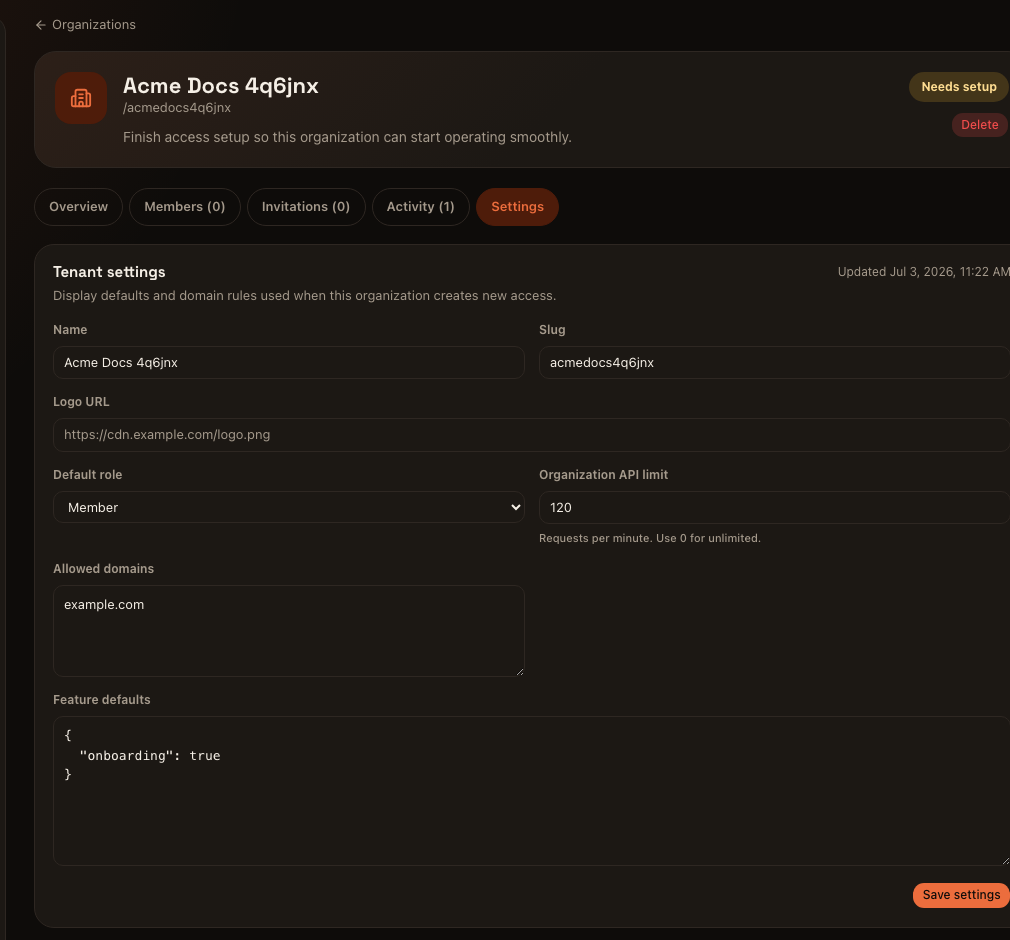
0 for unlimited.To update the same setting from your backend:
curl -X PUT "https://switera.com/api/v1/apps/$APP_ID/tenants/$ORG_ID/settings" \
  -H "Authorization: Bearer $SWITERA_SECRET_KEY" \
  -H "Content-Type: application/json" \
  -d '{
    "api_rate_limit_per_minute": 120
  }'
When a key or organization exceeds a request limit, Switera returns 429 and rate-limit headers:
| Header | Meaning |
|---|---|
X-RateLimit-Limit | The active request limit for the current window. |
X-RateLimit-Remaining | Requests left in the current window. |
X-RateLimit-Reset | Unix timestamp when the window resets. |
Retry-After | Seconds to wait before retrying after a 429. |
App-scoped route map
These are the main app management route groups available to trusted backends. The table uses organization in descriptions, while the API path keeps the launch contract name tenants.
| Area | Routes | Typical scope |
|---|---|---|
| Apps | GET /api/v1/apps/{appId} | view |
| App admin | PUT /api/v1/apps/{appId}, DELETE /api/v1/apps/{appId} | admin |
| Organizations | GET /api/v1/apps/{appId}/tenants, POST /api/v1/apps/{appId}/tenants | view, manage_tenants for create |
| Organization detail | GET /api/v1/apps/{appId}/tenants/{tenantId} | view |
| Organization settings | GET /api/v1/apps/{appId}/tenants/{tenantId}/settings, PUT /api/v1/apps/{appId}/tenants/{tenantId}/settings | view, manage_tenants for update |
| Organization users | GET /api/v1/apps/{appId}/tenants/{tenantId}/users, POST /api/v1/apps/{appId}/tenants/{tenantId}/users/{userId}/invite | view, manage_users for invite/remove |
| Invitations and members | /api/v1/apps/{appId}/tenants/{tenantId}/invitations, /members, /roles, /domains, /groups | manage_tenants |
| App users | /api/v1/apps/{appId}/users and /users/{userId} | view, manage_users for mutations |
| Auth settings | /api/v1/apps/{appId}/auth/... | manage_settings |
| API keys | /api/v1/apps/{appId}/keys and /keys/usage | manage_settings; key update requires admin |
| OAuth client settings | /api/v1/apps/{appId}/oauth2/... | manage_settings |
| Email settings and workflows | /api/v1/apps/{appId}/email/... and /email-templates/... | manage_settings |
| Webhooks | /api/v1/apps/{appId}/webhooks/... | manage_settings |
| Storage, managed data, and encryption | /api/v1/apps/{appId}/storage/..., /data/..., /vault/... | manage_settings |
| Billing settings | /api/v1/apps/{appId}/billing/... | manage_settings |
| Directory sync, Auth hooks, Actions, Radar, FGA, and log streams | /api/v1/apps/{appId}/directory-sync/..., /hooks/..., /actions/..., /radar/..., /fga/..., /log-streams/... | manage_settings |
| Audit logs | /api/v1/apps/{appId}/audit-logs | admin |
Isolation and status-code contract
Use these responses when testing an integration:
| Scenario | Expected response |
|---|---|
| Missing or malformed credential | 401 Unauthorized |
| Secret key belongs to another app | 403 Forbidden |
| Publishable key used for a server-side management route | 403 Forbidden |
| Secret key lacks the required scope | 403 Forbidden |
| Secret key is expired | 401 Unauthorized |
| Caller IP is outside the key allowlist | 403 Forbidden |
| Per-key or organization request limit is exceeded | 429 Too Many Requests with rate-limit headers |
| Secret key is valid and the route exists | Route-specific 2xx, 4xx, or validation error |
Only authenticated app-scoped secret-key traffic is counted in API request usage and usage-based Billing meters. Browser-session calls and rejected wrong-app keys are not treated as successful app API usage.
Troubleshooting
| Response | Check |
|---|---|
401 Unauthorized | The key is missing, malformed, expired, or not a secret key for server-to-server management. |
403 Forbidden | The key belongs to a different app, does not have the required scope, or the caller IP is not allowed. |
429 Too Many Requests | The key-level or organization-level request limit was exceeded. Check the rate-limit headers before retrying. |
| Empty usage metrics | Send at least one request with a secret app key, then reload the API Keys page. Browser-session calls do not count as secret-key traffic. |
Related pages: